Halloween Pumpkin Carving Contest · Starts October 1st · $500 in prizes
← Back to ideas
@ai_concepts
Sep 25, 2026
Yoshi Head Silhouette Easy Pumpkin CarvingAI
0

Report this carving

Tell us what is wrong. Reports are private.

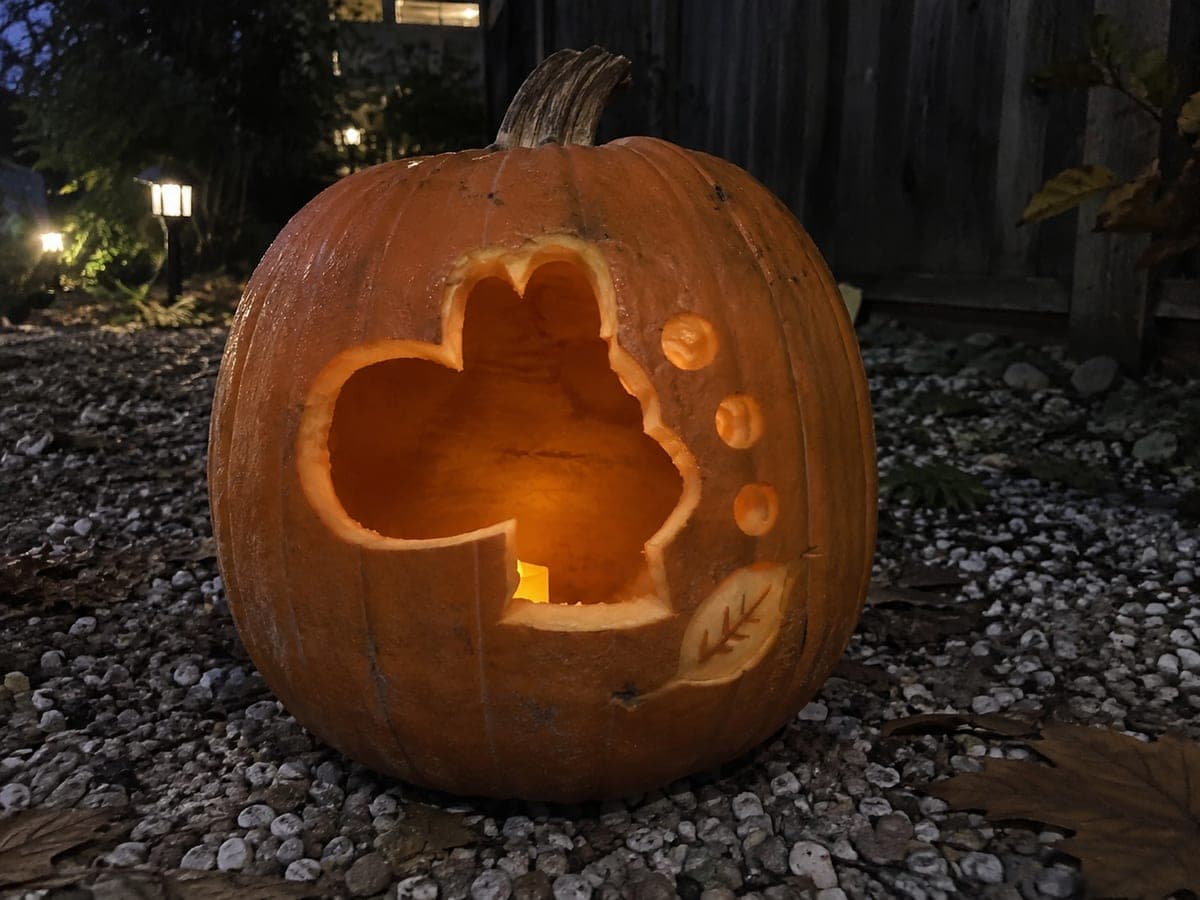
Yoshi Head Silhouette Easy Pumpkin Carving

Yoshi's round head shape is cut through as one true silhouette aperture on this easy Yoshi pumpkin carving idea, with small round and leaf accent marks kept as shallow back-carved details so no piece floats free. The simple outline-only approach means there are no interior bridges to navigate, making it an excellent first video-game pumpkin carving project. Use a rounded linoleum gouge for the shallow accent marks so the edges stay smooth against the orange rind.

No ratings yet · Sign in to rate
Comments (0)

  • No comments yet — be the first.

Save without an account. Sign in to like or comment.

Our tips for carving a similar design

Yoshi's rounded head is cut as one true silhouette aperture with no interior pieces to retain, making the cutting process purely about following a smooth curve. Small round and leaf accent marks around the silhouette are kept shallow-backed so they add character without creating floating pieces. Because there are no bridges or retained details, this is one of the cleanest entry-point video-game carvings available.

From pumpkin to porch

  1. Prep and transfer

    Scoop from the back and thin interior walls to about an inch. Print the stencil at the correct scale for your pumpkin and tape it to the front, anchoring the nose and chin areas with extra tape since these have tight curves. Transfer the head outline and all accent mark positions with a pounce wheel.

  2. Score the outline

    Trace the full head silhouette boundary with a scoring tool or the tip of a linoleum cutter, creating a shallow guide channel. This is especially helpful around Yoshi's large rounded head where the curve changes direction gradually. The scored channel keeps the saw blade on track throughout the cut.

  3. Cut the silhouette

    Use a fine-tipped detail saw to cut the head silhouette in one continuous pass, following the scored channel. Keep gentle, steady pressure and let the blade follow the curve naturally. Remove the large slug carefully by pushing it inward and extracting it through the back lid opening.

  4. Add the shallow accent marks

    Switch to a rounded linoleum gouge for the small round accent marks and a narrow V-gouge for the leaf accents. Work from the accent marks nearest the silhouette edge outward, keeping each mark at a consistent depth of about a third of the rind thickness. Smooth edges produce the most polished result on these accents.

  5. Clean the cut edge

    Run a fine gouge around the inside of the silhouette opening to remove any ragged flesh fibers. A clean interior edge produces a crisper glow line and prevents the edges from drying unevenly.

  6. Light and display

    Place a warm LED tea light inside and view in a darkened room. The glowing Yoshi head silhouette should be instantly recognizable against the dark surrounding rind. Apply petroleum jelly around the cut edge. A green-tinted LED light is a fun choice for a Yoshi-themed display.

Written with AI to match this design

Gather your supplies

Check things off as you get ready.

Work on a stable surface, keep your free hand out of the cutting path, and have an adult handle sharp tools.

Three levels of light

  • Leave intact

    The intact rind surrounding the silhouette stays dark, cleanly framing the glowing Yoshi shape

  • Peel & shade

    Small round and leaf accent marks outside the silhouette are shallow-backed to cream flesh for soft mid-tone detail

  • Cut through

    The entire Yoshi head silhouette aperture is fully cut through for a single bright glowing shape

Learn the carving basics

Before you start cutting

Yoshi's head is very round. How do I cut a smooth curve without it looking choppy?

The key is not to stop and restart the saw. Keep the blade moving continuously around the curve, rotating the pumpkin toward you rather than steering the saw sideways. If you do need to stop mid-curve, re-enter the cut from the same direction rather than the opposite to avoid a visible change in the cut angle.

What if I want to add Yoshi's eye or nostril as a cut-through detail inside the silhouette?

You can add small interior details, but they will turn into bright light spots inside the glowing shape rather than defined features. A better approach is to shallow-back the eye and nostril areas inside the silhouette so they read as slightly darker recesses within the glow, giving them a subtle presence without becoming competing bright spots.

The leaf accents look very small. Can I skip them?

Yes, they are optional additions. The design reads perfectly well as just the head silhouette alone. The accents add a slight decorative border but are not needed for the design to be recognizable. Skip them if you want the cleanest and quickest version of this carving.

Your take belongs here, too.

Changed a detail? Made it simpler? Share a photo of your version and tell the community what worked.

Share your pumpkin

More pumpkins like this

You've reached the end · 8 pumpkins
The Patch Report

Fresh pumpkins, in your inbox.

The best new carvings, ideas worth stealing, and how-tos for carving season. Short, seasonal, and gone by November.

A short email during carving season. Unsubscribe anytime. See our privacy policy.