Halloween Pumpkin Carving Contest · Starts October 1st · $500 in prizes
← Back to ideas
@ai_concepts
Sep 25, 2026
Easy Enderman Pixel Eyes Pumpkin Carving IdeaAI
0

Report this carving

Tell us what is wrong. Reports are private.

Easy Enderman Pixel Eyes Pumpkin Carving Idea

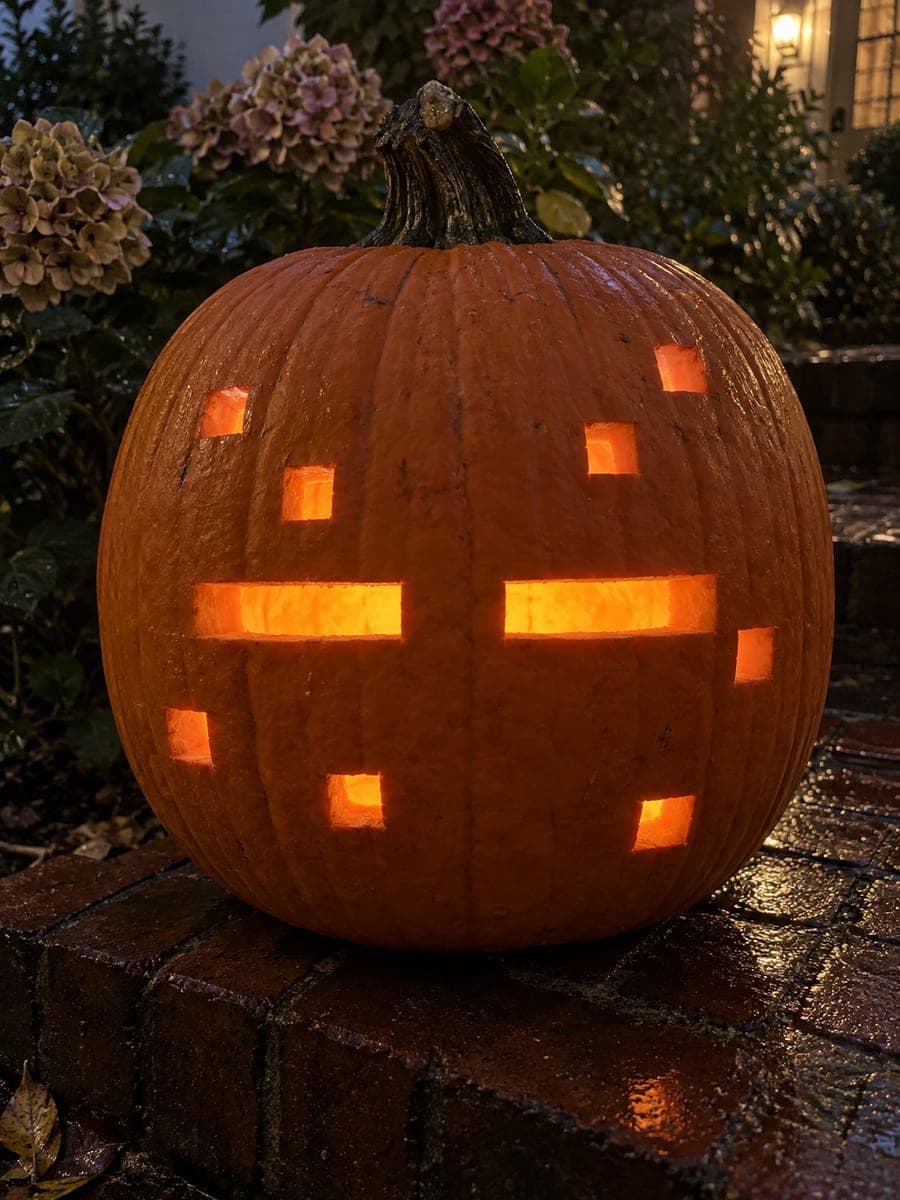
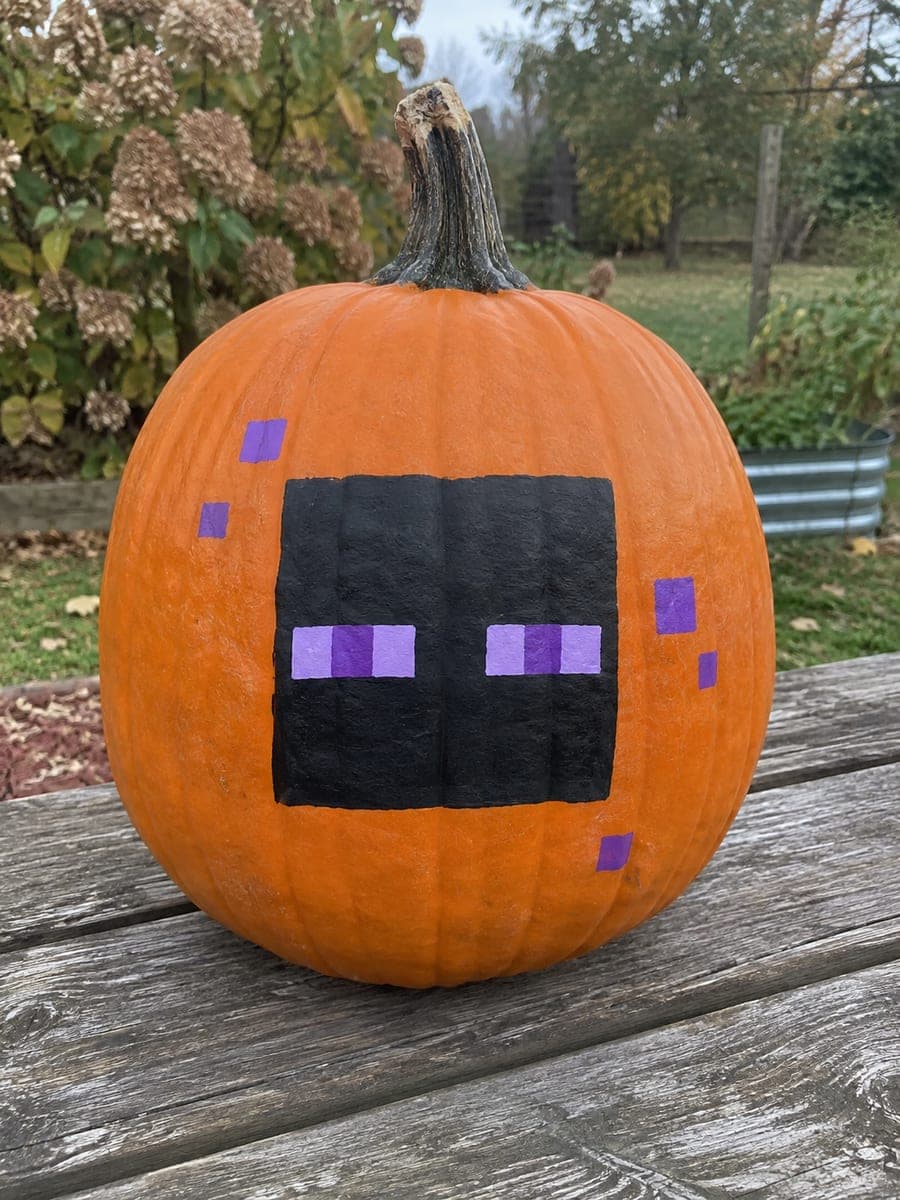
Two long rectangular eye holes divided by broad rind bars capture the Enderman's unsettling stare in this easy pumpkin carving idea, rounded out by a shallow square head outline and four small particle holes. The rind bars between the eye sections are what sell the pixelated look, so resist the urge to cut them away. Punch the particle holes last since they are the smallest cuts. A purple-tinted LED inside gives the glow an otherworldly color.

No ratings yet · Sign in to rate
Comments (0)

  • No comments yet — be the first.

Save without an account. Sign in to like or comment.

Our tips for carving a similar design

Two long horizontal rectangles divided by intact rind bars recreate the Enderman's characteristic pixel eyes. The rind bars between the eye sections are the design's signature detail, so keeping them in place matters more than any other single decision. Four small particle holes scattered around the head finish the look without adding structural risk.

From pumpkin to porch

  1. Hollow and mark the face zone

    Gut the pumpkin through the back and thin the front wall to about three-quarters of an inch for a bright glow. Center and trace a shallow square outline on the rind to represent the head shape. This outline can be a shallow score rather than a full cut, just enough to guide your eye placement.

  2. Mark the rectangular eye openings

    Draw the two long rectangular eye openings, leaving a clear rind bar at the outer end of each eye to preserve the pixelated look. Keep both eyes at the same height and the same distance apart. Double-check proportions before cutting since the eye spacing defines the whole expression.

  3. Cut the eye rectangles

    Use a thin detail blade to plunge into the corners of each rectangle, then saw along each straight edge carefully. Cut the four corners cleanly before removing the interior piece to keep the edges crisp. An adult should make all plunge cuts, keeping fingers on top of the rind well away from the blade path.

  4. Score the head outline

    If you want the head outline visible as a subtle frame, score it with a linoleum gouge just deep enough to thin the rind without breaking through. This mid-tone line will glow softly and add depth without creating fragile edges.

  5. Punch the particle holes last

    Place four small square particle holes around the eye area using a small apple corer or narrow blade. These are the smallest cuts, so saving them for last means the rind is still fully supported while you work the larger eye openings. Space them evenly for a teleporting-energy effect.

  6. Add a purple-tinted light and display

    Drop a purple-tinted LED puck inside the pumpkin and position it so the light spreads evenly across the eye rectangles. The cool purple glow against the orange rind intensifies the Enderman's otherworldly vibe. Display at eye level for maximum effect.

Written with AI to match this design

Gather your supplies

Check things off as you get ready.

Work on a stable surface, keep your free hand out of the cutting path, and have an adult handle sharp tools.

Three levels of light

  • Leave intact

    The broad rind bars between the eye sections and the rest of the face stay dark and intact.

  • Peel & shade

    The shallow head outline score glows faintly as a mid-tone ring around the face.

  • Cut through

    The two long rectangular eye holes and the four small particle holes are cut fully through.

Learn the carving basics

Before you start cutting

Why should I keep the rind bars between the eye sections?

Those bars are what make the eyes read as Minecraft pixel eyes rather than ordinary carved eyes. Removing them turns the two rectangles into one wide horizontal slit, losing the character entirely. They also add structural rigidity across the middle of the face.

Can I skip the particle holes if I want a simpler look?

Absolutely. The two eye rectangles alone are enough to make the Enderman recognizable. The particle holes are optional detail that fans of the character will appreciate, but the design works without them. Skip them if you are working with a younger carver or a smaller pumpkin.

What is the best way to keep my rectangular cuts from having jagged edges?

Score each line of the rectangle lightly first as a guide cut before deepening to full thickness. This prevents the blade from wandering on straight cuts. A ruler held against the rind can also guide a thin detail blade for the long horizontal edges.

Your take belongs here, too.

Changed a detail? Made it simpler? Share a photo of your version and tell the community what worked.

Share your pumpkin

More pumpkins like this

You've reached the end · 8 pumpkins
The Patch Report

Fresh pumpkins, in your inbox.

The best new carvings, ideas worth stealing, and how-tos for carving season. Short, seasonal, and gone by November.

A short email during carving season. Unsubscribe anytime. See our privacy policy.